간단한 도서관리 프로그램 ! !
import java.util.Scanner;

public class BookTest {
	public static void main(String[] args) throws Exception{
		Scanner sc = new Scanner(System.in);
		BookManager bm = new BookManager();

		int num =0;

		do {
			System.out.println("****************");
			System.out.println("1. 책등록");
			System.out.println("2. 책삭제");
			System.out.println("3. 책리스트");
			System.out.println("4. 책검색");
			System.out.println("0. 종료");
			System.out.println("****************");

			num = sc.nextInt();

			if(num==1) {
				System.out.println("아래 사항을 입력해주세요.");

				System.out.print("책 제목 : \n");
				String title = sc.next();

				System.out.print("책 저자 : ");
				String author = sc.next();

				bm.add(title, author);

			}
			else if(num==2) {
				System.out.println("삭제할 책 제목 입력 : ");
				String title = sc.next();
				bm.remove(title);
			}
			else if(num==3) {
				bm.getList();
			}
			else if(num==4)	{
				System.out.println("검색할 책 제목을 입력하세요 : ");
				String title = sc.next();
				bm.searchByTitle(title);
			}
		}while(num!=0);
	}
}
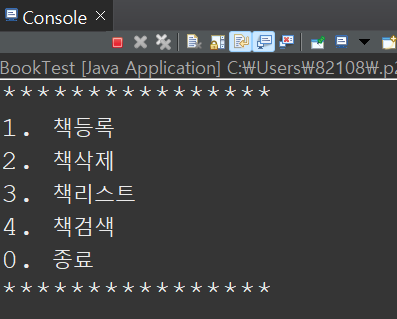
콘솔창 메인에 띄워지는 BookTest 클래스이다. 아래처럼 콘솔창에 출력됨.
public class Book {
	private String title;
	private String author;

	public String getTitle() {
		return title;
	}

	public void setTitle(String title) {
		this.title = title;
	}

	public String getAutor() {
		return author;
	}

	public void setAuthor(String author) {
		this.author = author;

	}

	public Book() {
	}

	public Book(String title, String author) {
		super();
		this.title = title;
		this.author = author;

	}

	public String toString() {
		return " 책 제목 : "+title + "\t책 저자 :  " + author;
	}
} // book class
책 제목과 책 저자를 리턴 해주는 Book 클래스이다 .
public class BookManager {
	Book[] books = new Book[100];
	int size = 0;

	public void add(String title, String author) {
		Book b = new Book();
		b.setTitle(title);
		b.setAuthor(author);

		books[size++] = b;
	}

	public void remove(String title) {
		System.out.println("***** 책 삭제 *****");
		for (int i = 0; i < size; i++) {
			if (books[i].getTitle().equals(title)) {
				for (; i < size; i++)
					books[i] = books[i + 1];
			}
			size--;
		}
	}

	public void getList() {
		System.out.println("***** 책 리스트 *****");
		for (int i = 0; i < size; i++)
			System.out.println(books[i]);

	}

	public void searchByTitle(String title) {
		System.out.println("***** 책 검색 *****");
		for(int i=0;i<size;i++) {
			if(books[i].getTitle().equals(title)) {
				System.out.println(books[i]);
			}
		}
	}
}
위에서 Book 클래스를 객체로 생성해서 사용했다.
책등록 , 책삭제 , 책리스트 , 책검색 4가지 메서드를 만들어서 활용할수있게 만든 BookTest 클래스이다.
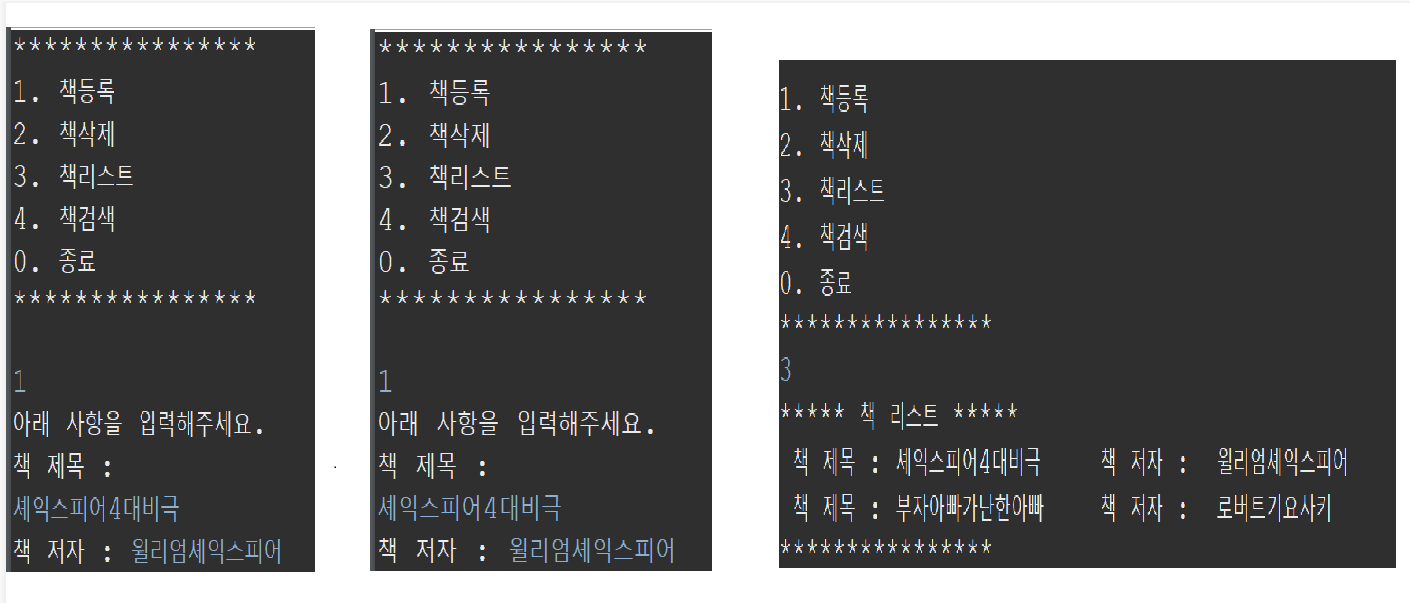
위 처럼 메서드를 활용해서 책등록 책리스트 등 메서드를 활용할수 있다.
'개발 공부 > Java' 카테고리의 다른 글
| [Java] JVM 메모리 구조 (0) | 2024.11.10 |
|---|---|
| SOLID - 객체 지향 설계의 5원칙 (0) | 2024.11.01 |
| GUI 활용해서 계산기 만들기 (0) | 2022.08.08 |
| HashSet 이용한 Lotto 예제 (3) | 2022.07.28 |
| 코딩 공부 링크 모음 집 (0) | 2022.07.27 |


